SILO upgrade requirements: the September IAM repairs require a coordinated upgrade of all participating nodes and a backup containing deletion history. Read IAM Upgrade and Recovery and Audit Historical Replica State, and use the component matrix to distinguish main from published artifacts.
Site replication configures multiple independent MinIO deployments as a cluster of replicas called peer sites.
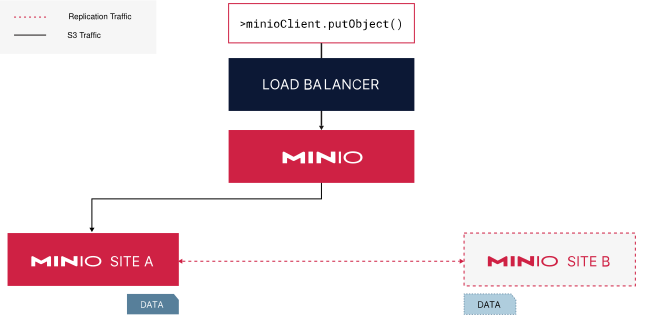
A site replication deployment with two peer sites.
A load balancer manages routing operations to either of the two sites.
Data written to one site automatically replicates to the other peer site.
Site replication assumes the use of either the included MinIO identity provider (IDP) or an external IDP. All configured deployments must use the same IDP. Deployments using an external IDP must use the same configuration across sites.
MinIO does not recommend using macOS, Windows, or non-orchestrated container deployments for site replication outside of early development, evaluation, or general experimentation. For production, use a supported Linux or Kubernetes deployment and follow the site-replication procedure on this page.
Overview
What Replicates Across All Sites
Each MinIO deployment (“peer site”) synchronizes the following changes across the other peer sites:
Creation, modification, and deletion of buckets and objects, including
After the initial synchronization of data across peer sites, MinIO continually replicates and synchronizes replicable data among all sites as they occur on any site.
Site Healing
Any MinIO deployment in the site replication configuration can resynchronize damaged replica-eligible data from the peer with the most updated (“latest”) version of that data.
Note
Changed: RELEASE.2023-07-18T17-49-40Z
Site replication operations retry up to three (3) times.
MinIO dequeues replication operations that fail to replicate after three attempts. The scanner picks up those affected objects at a later time and requeues them for replication.
Note
Changed: RELEASE.2022-08-11T04-37-28Z
Failed or pending replications requeue automatically when performing any GET or HEAD API method. For example, using mc stat, mc cat, or mc ls commands after a site comes back online prompts healing to requeue.
Note
Changed: RELEASE.2022-12-02T23-48-47Z
If one site loses data for any reason, resynchronize the data from another healthy site with mc admin replicate resync. This launches an active process that resynchronizes the data without waiting for the passive MinIO scanner to recognize the missing data.
You can adjust how MinIO balances the scanner performance with read/write operations using either the MINIO_SCANNER_SPEED environment variable or the scanner speed configuration setting.
Synchronous vs Asynchronous Replication
MinIO supports specifying either asynchronous (default) or synchronous replication for a given remote target.
With asynchronous replication, MinIO completes the originating PUT operation before placing the object into a replication queue. The originating client may therefore see a successful PUT operation before the object is replicated. While this may result in stale or missing objects on the remote, it mitigates the risk of slow write operations due to replication load.
With synchronous replication, MinIO attempts to replicate the object prior to completing the originating PUT operation. MinIO returns a successful PUT operation whether or not the replication attempt succeeds. This reduces the risk of slow write operations at a possible cost of stale or missing objects on the remote location.
MinIO strongly recommends using the default asynchronous site replication. Synchronous site replication performance depends strongly on latency between sites, where higher latency can result in lower PUT performance and replication lag. To configure synchronous site replication use mc admin replicate update with the --mode option.
Proxy to Other Sites
MinIO peer sites can proxy GET/HEAD requests for an object to other peers to check if it exists. This allows a site that is healing or lagging behind other peers to still return an object persisted to other sites.
For example:
A client issues GET("data/invoices/january.xls") to Site1
Site1 cannot locate the object
Site1 proxies the request to Site2
Site2 returns the latest version of the requested object
Site1 returns the proxied object to the client
For GET/HEAD requests that do not include a unique version ID, the proxy request returns the latest version of that object on the peer site. This may result in retrieval of a non-current version of an object, such as if the responding peer site is also experiencing replication lag.
MinIO does not proxy LIST, DELETE, and PUT operations.
Prerequisites
Back Up Cluster Settings First
Use the mc admin cluster bucket export and mc admin cluster iam export commands to take a snapshot of the bucket metadata and IAM configurations respectively prior to configuring Site Replication. You can use these snapshots to restore bucket/IAM settings in the event of misconfiguration during site replication configuration.
One Site with Data at Setup
Only one site can have data at the time of setup. The other sites must be empty of buckets and objects.
After configuring site replication, any data on the first deployment replicates to the other sites.
All Sites Must Use the Same IDP
All sites must use the same Identity Provider. Site replication supports the included MinIO IDP, OIDC, or LDAP.
All Sites Must use the Same MinIO Server Version
All sites must have a matching and consistent MinIO Server version. Configuring replication between sites with mismatched MinIO Server versions may result in unexpected or undesired replication behavior.
You should also ensure the mc version used to configure replication closely matches the server version.
Access to the Same Encryption Service
For SSE-S3 or SSE-KMS encryption via Key Management Service (KMS), all sites must have access to a central KMS deployment.
You can achieve this with a central KES server or multiple KES servers (say one per site) connected via a central supported key vault server.
Replication Requires Versioning
Site replication requiresBucket Versioning and enables it for all created buckets automatically. You cannot disable versioning in site replication deployments.
MinIO cannot replicate objects in prefixes in the bucket that you excluded from versioning.
Load Balancers Installed on Each Site
Specify the URL or IP address of the site’s load balancer, reverse proxy, or similar network control plane component. Requests are automatically routed to nodes in the deployment.
MinIO recommends against using a single node hostname for a peer site. This creates a single point of failure: if that node goes offline, replication fails.
Switch to Site Replication from Bucket Replication
Bucket replication and multi-site replication are mutually exclusive. You cannot use both replication methods on the same deployments.
If you previously set up bucket replication and wish to now use site replication, you must first delete all of the bucket replication rules on the deployment that has data when initializing site replication. Use mc replicate rm on the command line to remove bucket replication rules.
Only one site can have data when setting up site replication. All other sites must be empty.
The three sites use aliases, minio1, minio2, and minio3, and only minio1 contains any data.
Deploy three or more separate MinIO sites, using the same IDP
Start with empty sites or have no more than one site with any replicable data.
Configure an alias for each site
Specify the URL or IP address of the site’s load balancer, reverse proxy, or similar network control plane component. Requests are automatically routed to nodes in the deployment.
MinIO recommends against using a single node hostname for a peer site. This creates a single point of failure: if that node goes offline, replication fails.
For example, for three MinIO sites, you might create aliases minio1, minio2, and minio3.
Use mc alias set to define the hostname or IP of the load balancer managing connections to the site.
mc aliasset minio1 https://minio1.example.com:9000 adminuser adminpassword
mc aliasset minio2 https://minio2.example.com:9000 adminuser adminpassword
mc aliasset minio3 https://minio3.example.com:9000 adminuser adminpassword
If all sites are empty, the order of the aliases does not matter. If one of the sites contains any replicable data, you must list it first.
No more than one site can contain any replicable data.
Query the site replication configuration to verify
mc admin replicate info minio1
You can use the alias for any peer site in the site replication configuration.
Query the site replication status to confirm any initial data has replicated to all peer sites.
mc admin replicate status minio1
You can use the alias for any of the peer sites in the site replication configuration. The output should say that all replicable data is in sync.
The output could resemble the following:
Bucket replication status:
●  1/1 Buckets in sync

Policy replication status:
●  5/5 Policies in sync

User replication status:
No Users present

Group replication status:
No Groups present
You can add more sites to an existing site replication configuration.
The new site must meet the following requirements:
Site is fully deployed and accessible by hostname or IP
Shares the IDP configuration as all other sites in the configuration
Uses the same root user credentials as other configured sites
Contains no bucket or object data
Deploy the new MinIO peer site(s) following the stated requirements
Configure an alias for the new site
Specify the URL or IP address of the site’s load balancer, reverse proxy, or similar network control plane component. Requests are automatically routed to nodes in the deployment.
MinIO recommends against using a single node hostname for a peer site. This creates a single point of failure: if that node goes offline, replication fails.
Use the mc admin replicate add command to expand the site replication configuration with the new peer site. Specify the alias of all existing peer sites, then the alias of the new site to add.
For example, the following command adds the new peer site minio4 to an existing site replication configuration that includes the existing sites minio1, minio2, and minio3.
mc admin replicate add minio1 minio2 minio3 minio4
Note
Note
If any of the sites are unreachable or permanently lost, you must first remove the unreachable site(s) with mc admin replicate rm before expanding with the new site.
Query the site replication configuration to verify
mc admin replicate info minio1
Modify a Site’s Endpoint
If a peer site changes its hostname, you can modify the replication configuration to reflect the new hostname.
mc admin replicate update ALIAS --deployment-id [DEPLOYMENT-ID] --endpoint [NEW-ENDPOINT]
Replace [DEPLOYMENT-ID] with the deployment ID of the site to update.
Replace [NEW-ENDPOINT] with the new endpoint for the site.
Specify the URL or IP address of the site’s load balancer, reverse proxy, or similar network control plane component. Requests are automatically routed to nodes in the deployment.
MinIO recommends against using a single node hostname for a peer site. This creates a single point of failure: if that node goes offline, replication fails.
Remove a Site from Replication
You can remove a site from replication at any time. You can re-add the site at a later date, but you must first completely wipe bucket and object data from the site.
Displays the replication status summary for all replication sites of which minio3 is part.
The output resembles the following:
Bucket replication status:
●  1/1 Buckets in sync

Policy replication status:
●  5/5 Policies in sync

User replication status:
●  1/1 Users in sync

Group replication status:
●  0/2 Groups in sync

Group           | MINIO2          | MINIO3          | MINIO4
ittechs         | ✗  in-sync      |                 | ✗  in-sync
managers        | ✗  in-sync      |                 | ✗  in-sync
2 - IAM Upgrade and Recovery
Coordinate the IAM revocation upgrade, preserve complete deletion history, and rehearse recovery.
The current upgrade target is Server 20261026. The 20260916/20261018 revocation-history and authorization requirements below still apply. This release also repairs long-DN LDAP login, policy reloads and built-in policy Reset. Coordinate all participating nodes using the component matrix.
STS revocation verification: 20261018 also adds durable enumeration and propagation. After revoking the actual parent/token type, check old-token rejection and fresh-token validity at every node and site, including a reconnecting peer. Tokens never received from an isolated site are outside the requesting cluster snapshot; one successful response does not establish instantaneous global invalidation during a partition.
20261018 addition: The 20260916 revocation-history requirements in this procedure still apply. This release adds IAM Admin authorization repairs. Before the maintenance window, verify self denies, session restrictions, root targets and bulk-list aliases; historical keys are not rewritten automatically. See the 20261018 release notes for version and release status.
The IAM repairs in Server #191 and
#192 persist deletion revisions and
parent revocation boundaries. They prevent delayed site events from restoring
revoked identities and older grants. They require a coordinated upgrade of all
participating servers, including nodes without site replication that share an
IAM backend. Mixed old/new nodes on that backend and rolling downgrade are unsupported.
Release status: these repairs shipped in Server 20260916
and are absent from Server 20260903. This procedure covers coordinated upgrades
and recovery for the repaired version. Isolated upgrade/restore observations and remaining recovery checks are
tracked in #200; see the
validation scope. Publication of this page does not establish
production upgrade acceptance.
Prepare the maintenance window
Inventory every node, site, shared IAM backend, offline peer and backup. Record
the old and candidate Server SHA, binary checksum or image digest, deployment
configuration, root-credential source, external identity-provider settings and
KMS dependencies. Select the matching maintained components from the
component matrix; a standalone Console update does
not replace the Console embedded in a Server binary.
Use protected, preconfigured mcli aliases. These commands read state; run them
for each site and retain the outputs privately. Replace site-a with the actual
alias. Do not collect credentials or enable HTTP debug logging in shared evidence.
The replication command applies to sites with site replication configured.
Readiness alone does not verify IAM correctness. Check clock synchronization on
every node (for example, chronyc tracking on a chrony-managed Linux host), IAM
load errors and replication failures. Repair clock drift before the upgrade:
ordering uses timestamps, and a trusted peer’s future-dated deletion can reject
subsequent older updates until a newer revision is used.
Pause IAM administration and credential issuance, including automation. Isolate
unknown offline peers and prevent automatic restarts of old binaries. Drain
application traffic for the coordinated stop. Establish a list of revoked
identities, recreated parents and credentials requiring reissuance. Missing
deletion history cannot be reconstructed from a missing user record.
Stop here if any participating node, backend, backup, required key, unknown
peer or rollback procedure is unaccounted for. Do not admit an old snapshot to a
live replication group merely to inspect its contents.
Before upgrading, follow the password-policy migration.
Where an existing Deny admin:CreateUser also meant to prohibit changing one’s own
password, add admin:ChangeMyPassword to the same Deny with its existing scope and
conditions; retain both through rollback. Server 20260916 keeps multipart listing in
legacy by default. An ordinary upgrade does not require strict mode; only an
explicit opt-in needs the multipart preflight and drain procedure.
Preserve a complete recovery point
Stop all SILO processes sharing each backend before taking the final recovery
point. For systemd, use the deployment’s actual unit, then verify it is inactive
on every node. For an operator-managed deployment, use its tested maintenance
procedure and prevent reconciliation from restarting old Pods.
SILO_UNIT='silo.service'# replace with the installed unit namesudo systemctl stop "$SILO_UNIT"systemctl is-active "$SILO_UNIT"# expected: inactive; nonzero exit is normal
Backend
Required recovery material
Verification before proceeding
Object storage
A consistent, restorable backup of the complete IAM store, including revisions, deletion records and retained parent boundaries. Use the deployment’s tested full-storage snapshot/backup procedure with all required pool/set/drive mappings.
Restore to an isolated clone with the matching topology and confirm IAM loads. Copying a visible user directory or one erasure-coded drive is insufficient.
etcd
A complete etcd snapshot, member/topology configuration, certificates and authentication material, plus SILO’s endpoint/prefix and encryption configuration.
Check the snapshot, then restore to an isolated etcd cluster using the documented procedure for that etcd version. Do not restore a shared etcd cluster over unrelated workloads.
Both
Exact binaries/images, deployment configuration, root-secret references, KMS/key recovery material and the revocation/change ledger since the backup.
Verify access to the required keys independently of the cluster being replaced. Store secret material separately from review logs.
For etcd, use the deployment’s authenticated TLS configuration and a supported
etcdctl/etcdutl version; see the etcd recovery guide.
The following are backup/check commands; they do not
restore a running cluster:
etcdctl --endpoints="$ETCD_ENDPOINT" snapshot save iam-upgrade-evidence/etcd.db
etcdutl snapshot status iam-upgrade-evidence/etcd.db --write-out=json
A live mcli admin cluster iam export contains useful live records but omits
deletion history. It is not the recovery point for this upgrade. A snapshot
checksum proves file identity; it does not prove that restore and revocation
checks work. Record the backup’s time, scope, checksum and successful clone
restore separately.
Upgrade and verify
Replace binaries/images on all stopped nodes of each shared backend.
Start only upgraded nodes. Keep unknown/old peers isolated and complete the
coordinated upgrade across sites before relying on the new guarantees.
Repeat mcli --json admin info site-a, mcli ready site-a and
mcli --json admin replicate status site-a. Verify the actual identity of
every process, clean IAM loading and working cross-site communication.
Run the write-readiness check against each process endpoint, not just a load
balancer. On distributed nodes, confirm IAM load(startup) finished. in each process’s
current startup log and, when site replication is configured, also
Cluster replication initialized. /minio/health/ready and successful root requests
can precede these background initializers. Wait for both before issuing STS
credentials; the startup messages still do not replace the credential checks
below.
Check IAM metrics for revision counts, healing failures and last successful
healing. A quiet error counter alone does not prove credential revocation.
The background pass runs periodically; its interval is not a convergence SLA.
On every site, use designated canary aliases to read the same pre-existing
object. An old revoked credential must fail authorization; a deliberately
reissued credential with the required policy must succeed. A timeout, 5xx or
missing object is inconclusive. Preserve the error code, site and credential
label, never its secret.
mcli --json stat --no-list revoked-canary/upgrade-canary/probe
mcli --json stat --no-list reissued-canary/upgrade-canary/probe
Reissue service-account/STS credentials belonging to a recreated parent.
Older credentials lack the retained parent boundary required after
revocation. Parents with no retained revocation history keep their existing
credential behavior. Attach only the intended current grants.
Explicitly reconcile known pre-upgrade deletions on sites still holding old
records. Rebuild stale offline peers from approved state before reconnecting
them. Repeat the credential checks after restart and peer catch-up.
In the Server 20261026, deleting an explicit built-in policy override immediately restores the native definition while retaining the deletion revision to reject stale overrides (absent from Server 20261018). Verify built-in policy Reset on each node and again after restart and peer catch-up, and confirm that in-use rejection and custom-policy deletion behave as expected. Ordinary legacy group-member removal during an outage remains outside the durable parent-deletion guarantee.
Reopen access only after version identity, backend recovery, IAM loading,
replication and both credential checks pass. If a stale credential succeeds,
keep affected sites isolated and investigate; restarting until health is green
does not resolve the authorization failure.
Errors and observability
A revocation can persist and then return HTTP 500 with
IAM revocation committed; cleanup failed when dependent cleanup fails. This does
not roll back the revocation. Keep IAM writes paused, inspect the identity and
logs, and retry cleanup; do not blindly repeat deletion after a same-name identity
has been recreated. This path publishes to local sibling caches but may skip the
immediate cross-site hook, so verify later site reconciliation. STS fails closed
with STSInternalError if it cannot read the parent revocation boundary; that is
neither successful issuance nor proof of a revoked credential.
Collect these from every process at /minio/metrics/v3/cluster/iam:
Metric
Meaning
minio_cluster_iam_revocation_records
Persistent revocation records observed by this process
These are process metrics, not additive unique-record counts. The three heal_*
metrics advance only with site replication enabled and on the node holding the
leader lease. A shared-backend deployment without site replication performs no
such pass; zero healing metrics are expected. Tombstones have no TTL or automatic
compaction: budget for durable capacity and startup reads. Initial reconciliation
may backfill missing revisions and produce a write burst. Neither its interval
nor these metrics establish a convergence SLA.
A deleted access-key canary normally returns 403 InvalidAccessKeyId; other
revocation mechanisms require their appropriate authorization failure, not a
universal error-code assertion. A 5xx, timeout or missing object is inconclusive.
Live-record export/import omits deletion history and cannot preserve the guarantee
of earlier revocations by itself. See the IAM design
for ordering and remaining limitations.
Rollback and restore
Stop and isolate the affected sites first. Record all IAM changes and revocations
since the chosen recovery point. Restore the complete, compatible backend into
an isolated environment with its matching configuration, keys and binary; do
not start old software against a backend already changed by newer software.
An older backup can restore a credential revoked after that backup. Reapply the
revocation ledger or rekey affected identities before exposing the restored
system. If that ledger is incomplete, keep access isolated until the affected
scope is reconciled. Never remove tombstones, truncate revision history or
import only live records to make an old binary start.
After a restore, repeat the IAM/site-replication startup checks on every process
before issuing credentials. Verify temporary sessions separately from ordinary
users and service accounts. Reissue the required STS credentials after startup
and check them against every intended site; an old session failing on one site
does not prove that its parent identity is safely revoked everywhere.
Reconcile a known recovery group
One bounded recovery policy is to keep retired parent identities disabled,
remove their recorded service-account keys, detach revoked grants, and issue
replacement credentials under distinct identity names. Use the reviewed ledger
to select the actual users, keys and policies; all known sites must be online
inside the isolated recovery group, with stale or unknown peers excluded.
The isolated object-store and etcd rehearsals passed this policy with the
credential checks below. Apply the same checks to the actual recovery group
before approving access.
Check and apply reconciliation at every restored site. A successful command
at one site does not prove that the others applied it. After restoring an old
object-store snapshot with its old binaries, do not rely on site replication
alone to propagate revocations. Confirm already-removed service keys are absent,
keep replacement identities and credentials consistent across the recovery
group, and require the per-process credential checks below before opening access.
The following shows the operations against one protected recovery alias. Replace
the uppercase names with reviewed entries. User creation prompts for a secret;
service-account creation prints credentials, which belong in the approved
secret store rather than the rehearsal log.
Issue designated STS canaries through the application’s usual authenticated
flow after startup completes, and verify each new session on every intended
process. If issuance or cross-site reads fail, keep the recovery group isolated,
retain the failure evidence and investigate. A fresh canary may be issued again
within the planned maintenance window; an elapsed timer alone cannot approve
access. Check the retired user, recorded service keys, revoked
mapping and both pre-restore and newly issued sessions of the retired parent.
They must all be denied on every process that will serve clients. The replacement
user, service account and freshly issued STS credentials must work. Repeat these
checks after a complete restore of the reconciled backup. Keep access isolated
if any check fails; this policy does not permit reconnecting a stale old peer or
re-enabling a retired parent on old software.
Required rehearsal record
For each supported backend, use isolated old/new multi-process sites and
record exact binary identities and backup/restore commands. Exercise deletion
during peer disconnection, delayed old-event replay, deliberate same-name
recreation and credential reissue. Repeat after restart and full restore; also
test rollback to a recovery point predating a deletion. Old credentials must
remain denied after reconciliation while intended new credentials work.
Source regression evidence in #192
supports the protocol implementation. The rehearsal adds deployment topology,
backup completeness, restart and operator recovery evidence. Link the resulting
redacted observations in #200; keep
release-artifact validation and a real production rollout separate.
Validation scope
On 2026-09-16, isolated rehearsals upgraded Server 20260903 (9b11dc9469e6)
to build 70c7ec4a9fbf, whose runtime source matches baseline 40220bd836cb
(only the changelog differs). Both the object-store and etcd 3.6.13 backends
passed. Each run used three sites with two Server processes and four drives per
site; the etcd run used one independent etcd process per site.
Existing, non-revoked user, service-account and STS credentials survived the
coordinated upgrade. Revocations made while one site was stopped converged after
it returned. Cold restart and full restore from a post-revocation backup kept
old credentials and detached grants denied, while explicitly recreated and
reissued credentials worked. Same-key service-account replacement also retained
the new secret and rejected the old secret. Denial checks used signed reads of
a known object with a successful root control, rather than treating any request
failure as proof of revocation.
Restoring a pre-upgrade backup with its old binary made a subsequently revoked
credential work again, confirming the rollback hazard above. A subsequent
rehearsal applied the bounded reconciliation policy, then restored
the reconciled backup using the matching old binary:
Backend
Observed result after reconciliation and full restore
etcd 3.6.13
All six processes rejected the retired user, service key, revoked mapping and retired parent’s sessions; replacement users, service accounts and newly issued STS credentials worked. The isolated client-access checks passed.
Object store
The completed continuation from the same pre-upgrade backup rejected retired users, service keys, revoked grants and the retired parent’s STS. Replacement users, service accounts and fresh STS worked on all six processes after reconciliation and full restore.
The object-store laboratory also observed temporary STS write and cross-site
authentication failures after startup checks passed. A control using only
Server 20260903 also encountered an STS write failure after cold restart; this
does not establish a regression in the new build. The exact cause was not
isolated. Fresh STS probes later passed without changing the binaries or
configuration, and the completed recovery run required those end-to-end checks
before proceeding. Startup messages and a fixed waiting period are insufficient;
preservation of pre-restore STS sessions is outside the accepted recovery scope.
The laboratory used one isolated Linux ARM64 container with a shared clock and
no external peers; the etcd instances were single-member backends. Production
storage snapshots, HA etcd, external identity providers/KMS and clock skew were
not tested. Those deployment-specific checks, the startup observations and
exact artifact identities remain tracked in #200.
3 - Audit Historical Replica State
Inventory stored Content-Encoding by exact version and prepare a bounded historical-state repair.
Upgrading to the September replication repairs
prevents new errors. It does not rewrite old Content-Encoding, reconstruct lost
tags or establish that historical delete-marker purge work has converged.
#201 tracks inventory and recovery
readiness. No affected production installation has been identified by this review.
Read-only version inventory
Start with stored aws-chunked Content-Encoding, the transport token addressed
by #194. Inventory all versions on
the authoritative site and replicas. Checking only current objects misses
historical versions; a normal COPY can preserve polluted source metadata.
Download and inspect the read-only inventory script.
It uses Python 3 and boto3, calls only ListObjectVersions and exact-version
HeadObject, and emits JSON Lines. It does not read bodies, write objects, edit
storage files or collect credentials. Use an existing protected AWS profile
with s3:ListBucketVersions and s3:GetObjectVersion permissions on the chosen
scope. This profile is separate from an mcli alias. Allow any additional
read-only Object Lock permissions needed to inspect that deployment.
Download the script and its SHA-256 file, then verify it before execution. This revision is ccc9d035809b2b41157b4a3f1d35a21108ae4b3af2836e99416a1d2eec1efef2.
Keep the script revision/checksum, client dependency versions, Server identity,
bucket configuration, chosen prefix and start/end time with the inventory.
Use an empty prefix to cover the entire bucket and repeat for every relevant
bucket/site. Each data version requires one HEAD, so begin with a bounded
prefix and size the scan to the deployment. Listings are not atomic snapshots;
pause relevant changes or compare repeated inventories before any later repair.
The final summary row must have listing_complete: true. Exit code 0 means
the scan completed without ambiguous rows, not that it found no affected
headers; 2 means ambiguous rows remain, and 1 means listing failed. An
interruption or any unexpected failure without a complete summary is incomplete.
Classification
Meaning and next action
confirmed-header
HEAD returned a well-formed encoding list containing the exact aws-chunked token. The proposed header only removes that token. Raw bytes and a supported repair operation still need verification.
ambiguous
HEAD failed, LIST/HEAD identity or state changed, or encoding tokens are malformed, duplicated or noncanonical. Investigate; never turn a failed HEAD into an empty-header success.
unaffected-header
This successful exact-version HEAD did not contain the transport token. This says nothing about historical tags, purges, body integrity or another version.
delete-marker
A listed marker identity, retained for separate purge analysis. It has no object body to normalize.
Matching is token-based: gzip, aws-chunked is a candidate; my-aws-chunked
is not the transport token. Mixed encoding retains the other tokens in order.
Case variants and duplicates require manual review. SSE-C versions without
the required key can fail HEAD and remain ambiguous; this tool accepts no
SSE-C keys. Use an approved key-aware read procedure for those records without
placing keys in reports or command history.
Manifest and private evidence
The script records exact bucket/key/version, listing time/ETag/size, raw and
proposed Content-Encoding, metadata fingerprint and available replication,
encryption and Object Lock fields. User metadata values and KMS key identifiers
are omitted. Object names and version IDs may still be sensitive: retain the
full manifest privately and use stable replacements in shared reports.
This is an example, not an observed production object. Before approving any
write, enrich the private record with the trusted source/version relationship,
full ordinary/user metadata, exact-version tags, retention/legal hold, SSE mode
and key availability, independent raw-byte checksum and replication state.
Absent fields are unknown until the relevant authorized read confirms them.
The fingerprint detects differences; it cannot restore omitted metadata.
Retrieve raw object bytes without automatic Content-Encoding decompression and
compare them with the trusted source version or an independent known checksum.
Preserve genuine gzip bytes; do not recompress. An ETag alone is not a universal
content checksum, especially for multipart or encrypted objects. If the source
is missing, polluted or otherwise untrustworthy, keep the object unresolved.
Choose and rehearse a repair
Establish the authoritative exact version first, then its replicas. In
multi-way replication, compare every participating source. A still-polluted
source can make later heal/resync select metadata replication again; this
does not establish an uninterrupted retry loop.
Produce a per-version before/after change list. Remove only the verified
transport token. Preserve raw bytes, genuine encodings, user metadata, tags,
Object Lock and encryption requirements.
Rehearse the chosen supported operation on an isolated clone with the same
versioning, Object Lock, SSE and replication configuration. Ordinary self-COPY
may create a new version and change modification time or replication ordering;
it is not a generic in-place metadata repair API. If a replacement version is
required, explicitly document changed version identity and caller impact.
If no supported safe operation exists, leave the record unresolved. Do not
edit xl.meta or internal drive files.
Verify the encryption configuration and key availability at each destination;
an encrypted source alone does not establish encrypted replica storage.
After any restart, use a designated write/read canary on every serving
process, including replication targets, before COPY or rollback. Health
checks and successful reads can precede usable write quorum.
Immediately before a write, recheck exact version, ETag, size, metadata
fingerprint, timestamps, tags and lock state under the chosen write-coordination
procedure. A read-then-write check alone does not eliminate races; metadata
changes can leave ETag unchanged. Skip conflicts and re-inventory them.
On the clone, verify exact-version HEAD, unchanged raw-byte checksum, all
retained metadata/locks and eventual replica convergence. Exercise restart,
delayed old events and the specific rollback operation. A successful local
COPY response alone is insufficient.
Check exact version listings at every site and the source replication status
as well as current-object reads. After rollback, the replacement version must
be absent from every intended replica; a correct current object can coexist
with a version still awaiting purge elsewhere.
Keep the immutable manifest, full private metadata backup and a tested rollback
for the selected operation. If it created a new version, rollback must account
for that version and which version is current. Another COPY is not proof of
rollback. Reverting the binary can reopen the original error path and does not
undo prior metadata writes.
If a write fails or its outcome is uncertain, stop and re-inventory the exact
versions before retrying. An automatic COPY retry can create another version;
repeating the request is not a substitute for reconciling its outcome.
Tags and marker purge
Tag loss or resurrection: compare exact-version tags and available
revision/audit evidence across sites. An empty tag set can be intentional;
absence cannot reconstruct a lost tag history. Use an authoritative manifest
before planning a new tagging operation, which itself advances the revision.
Delete-marker purge: record the expected version, bucket, key and
modification time alongside purge/MRF status and replication errors. A
retained marker may be intentional or awaiting outbound replication. A 405
response alone does not prove that the expected marker was found or purged.
On 2026-09-16 the tool was exercised with a read-only account against actual
Server 20260903 storage, a stopped-storage clone upgraded to build 70c7ec4a9fbf
(runtime source baseline 40220bd836cb), and that clone after restart. All three inventories agreed on
21 version/marker records: six confirmed headers, two ambiguous encodings,
twelve unaffected headers and one marker. Fixtures included a non-current
version, null version, unusual object keys, gzip bytes, and SSE-S3 with retention
and legal hold. Original bytes, tags and the verified lock state survived the
upgrade; the old encoding headers also remained, as expected.
A separate clone rehearsal corrected one unlocked current object’s encoding
through an explicit replacement COPY. Raw gzip bytes and tags were preserved,
but COPY created a new version and left the original version’s header unchanged.
Deleting only that new, unlocked version restored the original current version.
This demonstrates the version/rollback distinction, not a general in-place
repair. That initial setup used one Linux ARM64 process/drive and a static test
KMS key.
An additional rehearsal used three sites, each with two Server processes and
four drives. A stopped Server 20260903 backup was restored into the same
candidate build above, with explicit SSE-S3 bucket defaults and a static lab
KMS key. Two unlocked gzip objects received replacement versions while one
site was offline. After it returned, all six processes served the same new
version IDs, raw gzip bytes, metadata and tags; the source reported replication
COMPLETED. Later tag updates to the historical versions remained separate
from the replacement versions. An untouched control retained SSE-S3,
GOVERNANCE retention and legal hold throughout.
Phase
Observed exact-version inventory at each site
Old storage and upgraded clone
Three affected original versions.
Replacement, offline-site catch-up and cold restart
Two corrected current versions plus the three affected original versions.
Delete only the two new unlocked versions, then cold restart
The three original versions remain; both replacement version IDs are absent.
The completed run checked signed write/read canaries on every process before
both COPY and rollback. Earlier attempts are retained: health/read checks
passed while writes returned SlowDownWrite, and a rollback begun immediately
after restart still had replacement versions in peer listings after 180
seconds. That observation does not establish a permanent replication failure;
the longer recovery path for that attempt was not tested. The completed
procedure requires actual write readiness and exact-version convergence.
The multi-site lab ran in one isolated Linux ARM64 container with a shared
clock. It did not validate SSE-C, external KMS, rewriting locked versions,
every delayed-event ordering or a general in-place historical-version repair.
Detailed results and remaining limits are tracked in
#201.
The inventory tool is preparation, not a repair engine. Configuration-specific
Object Lock/SSE/replication checks remain tracked in
#201. Record any production inventory
and writes separately against a selected deployment and reviewed change list.
For a confirmed-header row, proposed_content_encoding: null means remove the Content-Encoding field entirely, not set an empty string. A null value in other classifications is not a repair recommendation. See replica metadata normalization for the design.