# cert-manager
LLMS index: [llms.txt](/llms.txt)
---
## TLS certificate management with cert-manager {#tls-certificate-management-with-cert-manager}
This guide shows you how to install cert-manager for TLS certificate management. The guide assumes a new or fresh MinIO Operator installation.
> [!NOTE]
> **Note**
>
> This guide uses a self-signed `Cluster Issuer`. You can also use [other Issuers supported by cert-manager](https://cert-manager.io/docs/configuration/issuers/).
>
> The main difference is that you must provide that `Issuer` CA certificate to MinIO, instead of the CA’s mentioned in this guide.
Refer to the [cert-manager documentation](https://cert-manager.io) and your own organization’s certificate requirements for more advanced configurations.
cert-manager manages certificates within Kubernetes clusters. The MinIO Operator supports using cert-manager for managing and provisioning certificates as an alternative to the MinIO Operator managing certificates for itself and its tenants.
cert-manager obtains valid certificates from an `Issuer` or `ClusterIssuer` and can automatically renew certificates prior to expiration.
A `ClusterIssuer` issues certificates for multiple namespaces. An `Issuer` only mints certificates for its own namespace.
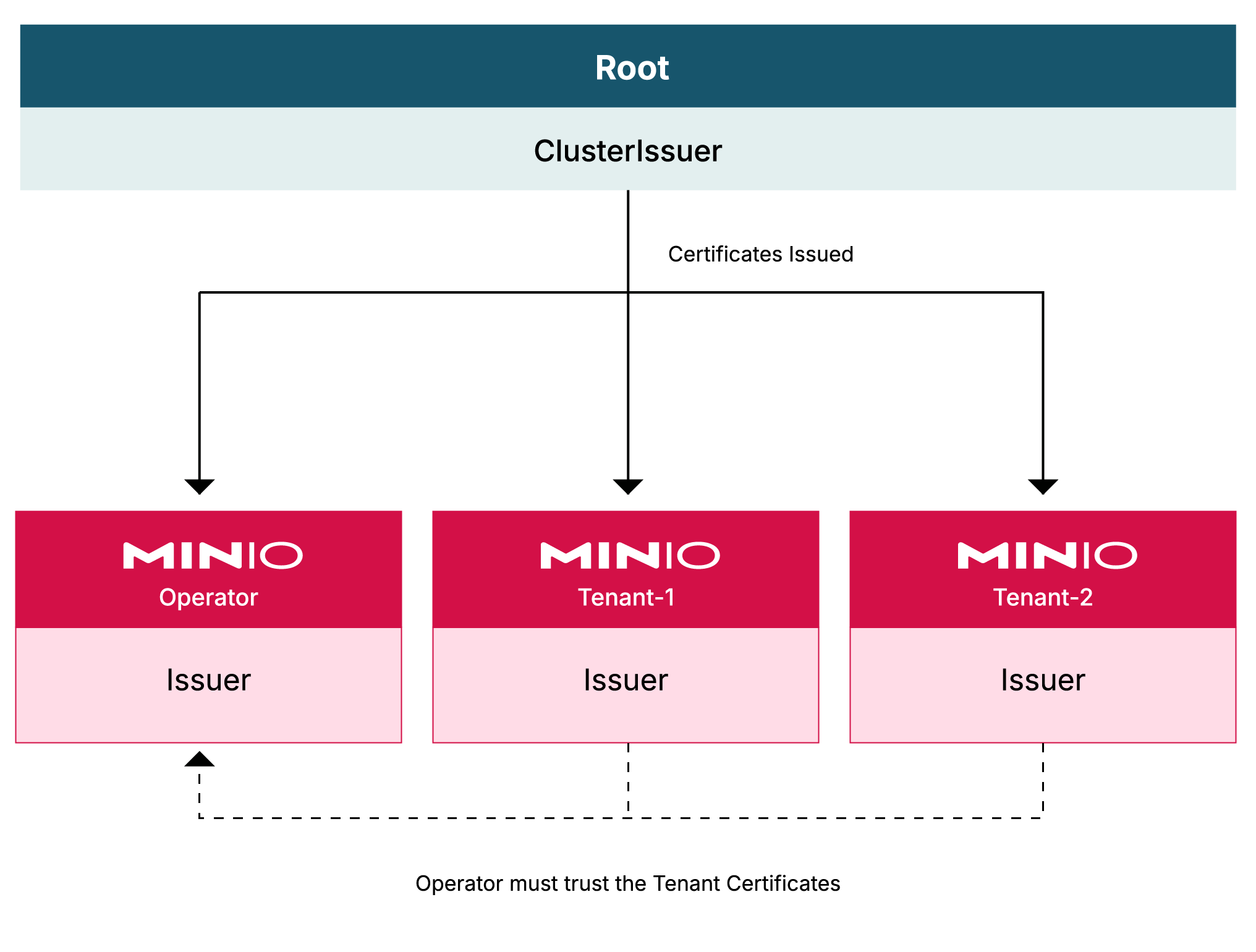
The following graphic depicts how cert-manager provides certificates in namespaces across a Kubernetes cluster.
- A `ClusterIssuer` exists at the root level of the Kubernetes cluster, typically the `default` namespace, to provide certificates to all other namespaces.
- The `minio-operator` namespace receives its own, local `Issuer`.
- Each tenant’s namespace receives its own, local `Issuer`.
- The certificates issued by each tenant namespace must be made known to and trusted by the MinIO Operator.
 ## Prerequisites {#prerequisites}
- A [supported version of Kubernetes](https://kubernetes.io/releases/).
- [kustomize](https://kustomize.io/) installed
- `kubectl` access to your `k8s` cluster
## Setup cert-manager {#setup-cert-manager}
### Install cert-manager {#install-cert-manager}
The following command installs version 1.12.13 using `kubectl`.
```shell
kubectl apply -f https://github.com/cert-manager/cert-manager/releases/download/v1.12.13/cert-manager.yaml
```
[Release 1.12.X LTS](https://cert-manager.io/docs/releases/release-notes/release-notes-1.12/) is preferred, but you may install the latest version. For more details on installing cert-manager, see their [installation instructions](https://cert-manager.io/docs/installation/).
### Create a self-signed Cluster Issuer for the cluster {#create-a-self-signed-cluster-issuer-for-the-cluster}
The `Cluster Issuer` is the top level Issuer from which all other certificates in the cluster derive.
1. Request cert-manager to generate this by creating a `ClusterIssuer` resource.
Create a file called `selfsigned-root-clusterissuer.yaml` with the following contents:
```yaml
# selfsigned-root-clusterissuer.yaml
apiVersion: cert-manager.io/v1
kind: ClusterIssuer
metadata:
name: selfsigned-root
spec:
selfSigned: {}
```
2. Apply the resource to the cluster:
```shell
kubectl apply -f selfsigned-root-clusterissuer.yaml
```
## Next steps {#next-steps}
Set up [cert-manager for the MinIO Operator](/operations/cert-manager/cert-manager-operator/#minio-certmanager-operator).
## Prerequisites {#prerequisites}
- A [supported version of Kubernetes](https://kubernetes.io/releases/).
- [kustomize](https://kustomize.io/) installed
- `kubectl` access to your `k8s` cluster
## Setup cert-manager {#setup-cert-manager}
### Install cert-manager {#install-cert-manager}
The following command installs version 1.12.13 using `kubectl`.
```shell
kubectl apply -f https://github.com/cert-manager/cert-manager/releases/download/v1.12.13/cert-manager.yaml
```
[Release 1.12.X LTS](https://cert-manager.io/docs/releases/release-notes/release-notes-1.12/) is preferred, but you may install the latest version. For more details on installing cert-manager, see their [installation instructions](https://cert-manager.io/docs/installation/).
### Create a self-signed Cluster Issuer for the cluster {#create-a-self-signed-cluster-issuer-for-the-cluster}
The `Cluster Issuer` is the top level Issuer from which all other certificates in the cluster derive.
1. Request cert-manager to generate this by creating a `ClusterIssuer` resource.
Create a file called `selfsigned-root-clusterissuer.yaml` with the following contents:
```yaml
# selfsigned-root-clusterissuer.yaml
apiVersion: cert-manager.io/v1
kind: ClusterIssuer
metadata:
name: selfsigned-root
spec:
selfSigned: {}
```
2. Apply the resource to the cluster:
```shell
kubectl apply -f selfsigned-root-clusterissuer.yaml
```
## Next steps {#next-steps}
Set up [cert-manager for the MinIO Operator](/operations/cert-manager/cert-manager-operator/#minio-certmanager-operator).